CROSS-STITCH TIME PLANNING · UPDATED 16 OCTOBER 2026
Estimate stitching time
from your own pace.
A useful time estimate starts with the work you actually have left. Count the stitches, measure a representative pace and divide the active time into sessions you can plan.
Open the project time calculator ↗
Count intended stitches, not empty squares
Chart width and height describe a bounding rectangle. Multiplying them gives all possible grid squares, not necessarily all the stitches in a design. Use your pattern's actual stitch total where available, or a consistent count of the stitches you intend to make.
For example, a hypothetical 100 × 100 chart has 10,000 grid squares. If only 6,000 squares are stitched, its intended total is 6,000. With 1,500 completed, 4,500 remain and progress is 25%. Using the full rectangle would overstate the remaining stitched work by 4,000 stitches.
Keep total, completed and sample counts consistent. Do not count a half-finished cross as a completed unit unless your total uses the same convention. This calculator does not translate backstitch lengths, beads, fractional stitches or different stitch types into equivalent full crosses. Keep those tasks separate, or measure a pace that genuinely matches the units you count.
Progress % = completed ÷ actual total × 100
Measure your own active pace
Choose a section representative of the stitching still ahead. Record completed stitches and active stitching minutes. Pause the timer for pattern preparation, counting and planning, thread sorting, unpicking, finishing and interruptions; add those tasks separately to an overall project schedule.
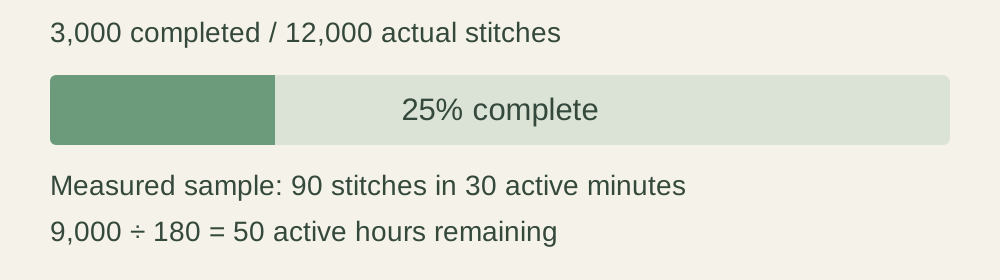
For a sample of 90 finished stitches in 30 active minutes, the rate is 90 ÷ 30 = 3 stitches per minute, or 180 per active hour. Those numbers are an example, not a benchmark. A sample with zero stitches or zero time cannot establish a positive pace.
Remaining active hours = remaining stitches ÷ stitches per hour
If you already know a suitable hourly pace, select the known-pace mode and enter it directly. Inactive mode fields are ignored, so an old sample does not silently change a known-rate estimate.
Worked example: 9,000 stitches remaining
Suppose your actual total is 12,000 stitches and you have completed 3,000. You have 9,000 left. At the example pace of 180 stitches per active hour, 9,000 ÷ 180 = 50 active hours, or 3,000 minutes.
Plan 45 active minutes per session. Dividing 3,000 by 45 gives 66⅔ session-equivalents. You need 67 sessions after rounding up. The first 66 use 66 × 45 = 2,970 minutes; the last needs 30 minutes.
Final session minutes = remaining minutes − (sessions − 1) × session minutes
If the division is exact, the final session is a full session. For example, 3,000 minutes divided into 30-minute sessions gives exactly 100 sessions, and the last uses all 30 minutes. No extra session is added at an exact boundary.
Separate weekly effort from calendar promises
At five 45-minute sessions per week, your planned weekly stitching time is 225 minutes, or 3.75 active hours. The 3,000-minute example is 3,000 ÷ 225 = 13⅓ effort-equivalent weeks.
The schedule contains 67 whole sessions. Five sessions per week means the first 65 fit in 13 planning weeks, and the final two occur in planning week 14. That is why the calculator also displays week 14 as the week containing the last planned session.
Effort-equivalent weeks = remaining active minutes ÷ weekly active minutes
Last-session planning week = sessions ÷ sessions per week, rounded up
The week count starts at the beginning of a planning week. The calculator does not know which days you stitch, where you are in the present week, whether a session is missed or when the project must be finished. It deliberately does not turn the estimate into a promised calendar date.
| Active session | Sessions / week | Remaining sessions | Last session | Last planning week |
|---|---|---|---|---|
| 30 minutes | 5 | 100 | 30 minutes | 20 |
| 45 minutes | 5 | 67 | 30 minutes | 14 |
| 60 minutes | 4 | 50 | 60 minutes | 13 |
Every row still contains 50 active hours. Changing the session plan redistributes the time; it does not make the remaining stitching require less effort.
Use a new pace when the work changes
A long block of one colour, isolated stitches, frequent thread changes and detailed areas may not proceed at the same rate. A short sample may also be unrepresentative. The calculator cannot infer those differences from a stitch total or fabric count.
Measure another representative section when the pattern or your way of working changes. You can compare scenarios by entering a slower or faster rate that you have chosen yourself. Keep the same remaining stitch count so you can see only the effect of pace.
For 9,000 stitches, a user-entered 150 stitches/hour gives 60 active hours. A user-entered 180 gives 50 hours. These are arithmetic alternatives, not a suggested range or an assessment of your skill.
What happens when the stitch count is complete?
When completed equals total, the result is 100% progress, zero remaining active hours, zero remaining sessions and zero planning weeks. This does not assert that framing, washing, finishing or any other non-stitch task is complete. Completed cannot exceed the actual total; correct either count if that happens.
Keep a plan you can revise
Copy, print or download the result to keep your entered counts, pace source, session plan and assumptions together. The calculator itself has no project account or saved history; refreshing clears the entries. Downloads stay on your device until you choose to share them.
Plan the physical fabric separately with the fabric cut-size calculator or compare counts for the same chart. Those tools calculate dimensions; this tool estimates active stitching time from actual work and pace.
For an arithmetic correction or privacy enquiry, use Stitchsize's contact page or email stitchsize.crispness171@aleeas.com.
The formulas and examples on this page are derived from the stated inputs. No industry stitch-rate benchmark is used.